
Claim Your Hotel Listing
Take control of your listing in 3 simple steps
1
Find your hotel
Search for your hotel on Tailstays using its name or location.
2
Click "Claim this listing"
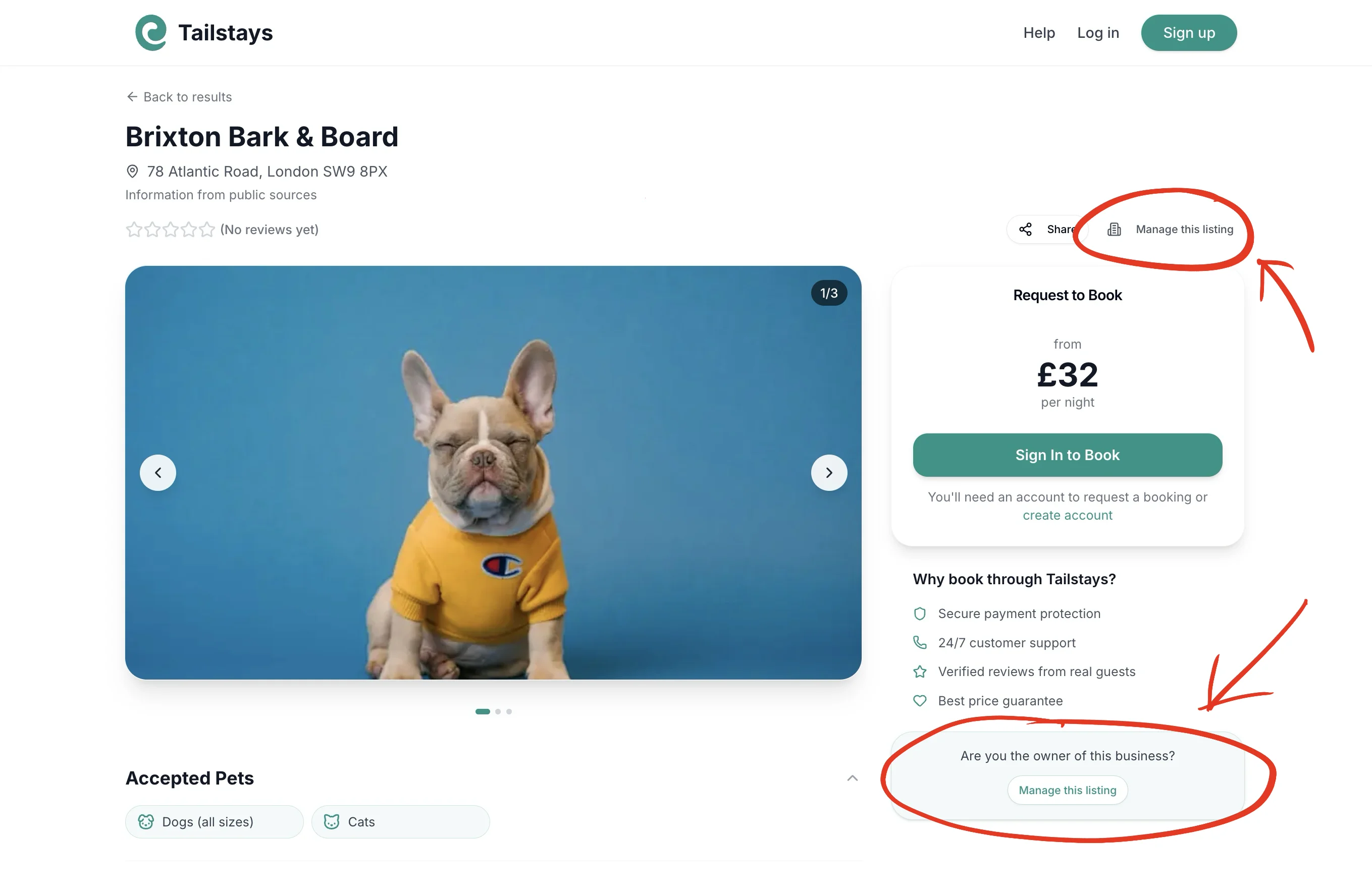
It is at the top of your listing page next to Share, or in the "Is this your business?" box further down.
3
Verify your email
We'll send a verification link to the business email we have on file. Click it to confirm ownership and gain full control of your listing.
Where to find the button
Look for "Claim this listing" at the top of the page next to Share (highlighted below), or the "Is this your business?" box further down. On a phone the box is near the bottom of the page.
What you get as a claimed hotel
- ✓Every enquiry: unclaimed listings see the details of 2 a month, claimed listings see them all
- ✓Your monthly stats: views, number taps and website clicks, on your dashboard
- ✓Your listing, your way: add photos, prices and what makes you different, so pet owners choose you
- ✓Show pet owners it's really you: your page says "Managed by the owner" instead of "Information from public sources"
Don't see your hotel?
We're constantly expanding. Email us your hotel name, address, and contact details and we'll add your listing.
support@tailstays.comNeed help claiming?
Don't have access to the email on file? We can verify your ownership another way.
Visit Help & Support